Some Apple Shortcomings
You can’t backup your Mac settings to iCloud.
I don’t think most Apple devices feel good to touch. They may feel “premium,” but I don’t think they feel good.
For example, Apple aluminum. (But I don’t think I like handling metal.)
(I think metal=premium may be a “supernormal stimulus” response.)
Plastic and/or silicone tends to feel better to me.
For example, my Kobo Libra 2.
Or this Samsung remote @ […].jpg
(I like silicone pot and pan handles @ […].jpg)
So I don’t understand not using a silicone iPhone case (leather is better than metal, but I don’t think it feels good, and a phone case’s lip gives edge swipes a target to hit).
(My Kobo sleep cover has “vegan leather” on its outside but microfiber on its inside. So when reading, I feel plastic and microfiber. The fake leather feels okay, but I only have to handle it briefly.)
(And the Libra 2 has a grooved edge that I think feels good @ […].jpg)
(But some criticize Kobo for not making “premium” devices.)
(For example @ The-eBook-Reader.com)
(I hope they don’t listen.)
MacBook Pro’s vents make it difficult to comfortably pick up.
MacBook Pro’s “mouth” (where you lift the lid) ends in two “sharp” points.
The squared edges on the top edge of MacBook Pro’s base don’t feel great.
(MacBook Pro may be “brutalist.”)
(Siri Remote has similar squared edges.)
(The Framework 12 has a plastic shell. If it had a full-sized keyboard and OLED screen or was dirt cheap, I think I might want one, but it’s $800, and I want to move on from LCD.)
While Apple trackpads work well, their haptic clicks often don’t quite feel “right” to me. (I press and get clicked.)
(Click → Light; Look up & data detectors → Tap with Three Fingers; Tap to click → Off.)
(And since I don’t think I really like touching its glass, I may get a plastic cover and see if it benefits me.)
“Magic Mouse.”
(I want a third-party mouse with scrolling that “just works”; I don’t want Logi Options+.)
Safari’s Reader can’t paginate documents.
And it’s happy to render vertical images (or videos) at sizes larger than the viewport.
The Apple News app can’t paginate documents.
And while you can “share” an Apple News article with Instapaper, you can’t print it on paper.
In Safari, Page Down can’t paginate documents: It’ll put the end of one “page” on top the next, so you have to keep finding your spot.
And it’s happy to scroll just an image top or image bottom (or video top or video bottom) into view.
(And I don’t think text cut off the top or bottom edge of a viewport is great, beautiful, or wonderful typography.)
“great typography”; “beautiful typography”; “wonderful typography” @ Stanford.edu
(But regardless, I can’t comfortably rest a thumb on an Apple Space bar like the next page button on my Kobo.)
There’s no “Send to Books” equivalent of “Send to Kindle.”
(You can “Share” documents with Books, but it doesn’t convert them.)
In Safari on iPad, vertical image files aren’t “responsive.”
In Safari on iPhone, image files aren’t “responsive” in landscape.
And Safari uses a white background for image files (even in Dark Mode).
(Firefox uses a #222 background; Chrome a #0e0e0e background.)
iMac doesn’t have an integrated power supply.
And “retina” iMacs never got “target display mode” (using an iMac as a monitor for another Mac).
No Mac has a 300 ppi screen.
Apple never replaced iWeb.
Apple released “Safari RSS” Apr 2005 and killed it Jul 2012.
(Google released Google Reader Oct 2005 and killed it Jul 2013.)
And there’s no first-party “RSS Button for Safari” in the “Customize Toolbar” options.
(Browser extensions tend to require scary permissions.)
The Apple Newsroom RSS feed doesn’t provide full content.
No “Apple Search.”
No Fitness+ for Mac.
iPhone Air can only play sound from one side.
(iPhones prior to 7 and iPads prior to the 1st Pro could only play sound from one side.)
Apple’s next display is rumored to be mini-LED (LCD), not OLED.
No serif Notes.
No TextEdit for iPad.
And I think I would remove its rich text mode.
TextEdit can’t “show invisibles”; Pages can’t show “word joiner.”
Character Viewer often won’t input characters the first time it’s opened. If you close and re-open it, it reliably works.
(Annoying, but even worse with zero-width invisibles like “word joiner.”)
Usually, you only gotta press Globe once for Character Viewer, but sometimes it’ll suggest emoji, so you gotta press twice, and you can’t turn “suggest emoji” off.
(But the emoji problem may solve the input problem.)
Emoji can be avoided using the menu bar, either Edit → Emoji & Symbols or with System Settings → Keyboard → Edit Input Sources → “Show Input Menu in menu bar.” It’ll be two clicks, but the added precision may be worth it, but since it doesn’t fix the input problem, it’ll often be six clicks.
(Input Menu → Show Emoji & Symbols is the top item, whereas Edit → Emoji & Symbols is the bottom item.)
Character Viewer won’t rememeber your spot in it across apps, and won’t remember your spot at all unless you close it with its red button.
Leaving Character Viewer open in apps often results in “beach balls” when switching apps.
You gotta double-click to input a character, even if you’ve already selected it.
Viewer’s picker renders invisibles invisibly, “logically,” not friendly.
“searching for ‘joiner’ ” @ MJTsai.com
(I think “monograms” in picker boxes like “HS” for “hair space,” “WJ” → “word joiner,” “NBS” → “no-break space,” and “ZWJ” for Wierschin & Tsai’s “zero width joiner,” may be better.)
“Logical” by Olivia Rodrigo @ YouTube.com
In Safari on Mac, I don’t like the native video player in full screen.
(I don’t want to have to drag the controls to get them out of the way; I want inconspicuous controls that disappear quickly.)
And you can’t “skip 15” in full screen.
In Safari on Mac, I don’t think the native video player is great.
If a video is paused, the controls never go away. (They do in QuickTime Player.)
You can’t “skip 15” with Left Arrow / Right Arrow.
You can’t toggle full screen with F.
You can’t toggle mute with M.
“Safari … darkens videos” @ UnderpassApp.com
If you click play, but the cursor is still touching the controls, they never go away.
If you click play and move the cursor, it takes them about 4s to go away.
(On iPhone, for HTML videos with no “poster,” Safari doesn’t show the first frame.)
(It does on iPad/Mac.) (Inconvenient.)
No Apple television set.
I think speaker location makes MacBook Pro worse for consuming video than iPad Pro with Magic Keyboard.
(Speakers in the keyboard base vs. speakers next to the screen.)
I don’t care anymore, but Netflix and the Criterion Collection don’t integrate with the TV app/Continue Watching.
On iPhone/iPad, you can reset auto-brightness by turning auto-brightness off and on in settings, but not on Mac.
You can’t subscribe to Apple Events in the TV app.
After deleting them, Mac apps often leave files and background items behind.
Safari makes it difficult to do a Google search of a web address (you can’t without removing “https://”).
Safari makes it difficult to do a Google search of link text.
(You can Control-click → Search Google on link text in Firefox.)
You can’t move Finder in the dock.
You can’t quit Finder, so its indicator dot is always on unless you turn “indicators for open applications” off.
I like the name “Finder” (better than “Files”), but some people really like Finder’s icon (“a perfect mark”). I like the original okay (with its overflowing line) as logo art, but as a dock icon, I sometimes find its always smiling faces a bit much (“toxic positivity”).
Like:
(But I think Finder icon redesign drama might be avoided by Finder icon options.)
“Continue Watching” doesn’t have its own tab in the TV app.
And you can’t manage it through its widget. You gotta go “Home.”
Tab Group Favorites occupies a permanent position at the top of bookmarks, even if you don’t have any. (I don’t think I want any.)
In Safari on Mac, you can’t switch windows from its “Tab Group picker.”
(Switching Windows from menu bar → Window is all the way at the bottom.)
(And I don’t think I want any Tab Groups.)
Any apps you’ve ever connected to the TV app appear in the TV app’s connected apps, even if you disconnect, delete, and hide the apps.
The TV app on Mac doesn’t have connected apps.
Shows from connected apps aren’t shown in your Continue Watching list on Mac.
Any apps unique to Apple TV can’t be hidden.
For example, DirecTV’s defunct NFL Sunday Ticket app.
(But I’ve never had DirecTV or Sunday Ticket.)
You can only hide and unhide TV app purchases on a Mac.
(And the UI is bad.)
If you watch an episode of a show from the TV app’s widget, the TV app will open that episode’s page in the background, which is good, but if you autoplay another episode or choose to watch another episode from the popup, the background page won’t update, which is bad.
(Can result in playing the wrong episode.)
To put an iPhone photo on justin-reeves.net, I have to “export” it; remember the difference between “export” and “export unmodified original”; and so forth.
(Or taking a photo, do I want “High Efficiency” or “Most Compatible”?)
You can’t export Photos app photos in AVIF.
Safari won’t show the “document tree” of an RSS feed unless “show features for web developers” is turned on (and so won’t show it at all on iPhone/iPad).
Instead, it will hide XML tags and give you their content (inlcuding any HTML tags) as a wall of unresponsive Times text with an #fff background.
(For JSON feeds, they give you the full document in Courier with responsive styling and a #1e1e1e background dark mode.)
XML
JSON
In Safari on iPhone/iPad, you can’t open HTML files from Files (without a third-party intermediary) like you can on Mac from Finder.
HTML files in Files can no longer be viewed full screen; and media embeds like <img> can’t be viewed.
You need a third-party device and a third-party app to receive local broadcast channels on an Apple TV (like an HDHomeRun with Channels or a Tablo with Tablo).
If I left a book open on my Kobo Libra 2 or left it on “My Books,” it opened where left. (A recent update opened on “Home.”)
I think Apple Books and Apple TV should reliably open where left.
(At least on Mac and iPad, Apple TV may in fact do this now.)
(And third-parties like Netflix don’t remember where one is after their frequent “updates”; they drop you back into their … “home.”)
@ news.YCombinator.com
(And I don’t know if it is still a problem, but a long time ago I tried editing a document in Pages on an iPad, but it wouldn’t autosave my position within the document, so when the app would run out of memory, I’d lose my spot.)
Stage Manager can’t be made to form a boundary (like the dock and menu bar).
The file picker for TextEdit and Pages can’t be maximized like a normal Finder window.
Family Sharing is price discrimination, but regardless, for two adults to share they have to pick one to be charged for the purchases of both.
If you add a page to Safari’s Reading List, it interferes with the functionality of the back button.
(And you can’t turn off Reading List’s “continuous scroll.”)
You can’t open an e-pub in Safari.
Window → Move & Resize → Left
Window → Left
Window → Move & Resize → Right
Window → Right
Can’t select or Command-F text in the Mac App Store.
Using “too many” <hr> on a page blocks Safari from offering its Reader mode (“Reader Available”).
But it works in Firefox and Vivaldi.
(Chrome doesn’t have a keyboard shortcut or menu bar item for “Reading Mode,” and it’s two levels deep under “More Tools” near the bottom of its “Customize and Control” menu.)
You now have to “unlock Apple Sports” (turn “Sync My Sports” on) to “Edit” what you “Follow.”
No Mac has Face ID.
No Lock Screen widgets on Mac.
Maybe not important, but in Safari:
xmp{font-family: serif, sans-serif;}
Gets you Helvetica.
(Yet it’s Times in Whisk’s Safari Web Preview.)
In Safari on Mac, the “go back” shortcut, Command-[, doesn’t work from discussions.Apple.com to Google.
I think fiddly settings should be easy to reset to default. For example, there’re ten trackpad tracking speeds, which is the default?
What’s an iPad?
With a Magic Keyboard, I think it’s a good portable or kitchen-counter TV.
But not much else.
It may fill a niche for some graphic artists, but I think most people who draw or handwrite would be better off, in principle, with an (e-ink) “e-note.”
But if iPad and MacBook do “merge,” and I were them, I think an Apple “e-note” would be part of my exit strategy.
The iPad Pro’s anti-reflective screen could be better.
(Nano-texture is a little fuzzy with lower contrast, so I don’t think it’s worth it for an iPad TV, but my experience with nano-texture is limited to a mini-LED MacBook Pro, so I don’t know how it is with an OLED iPad.)
On iPad, there’re third-parties (for example, Paramount+) that don’t support any keyboard controls.
(If a video is playing I want keyboard controls to “just work” unless an app has a good reason for them not to.)
I was surprised by “Crush” backlash. I didn’t like it, but I didn’t like it because they crushed a CRT. You can buy a brand new piano. You can’t buy a brand new CRT TV — a still great technology that dominated culture for half a century. That is being lost. Human history is being lost.
No “Apple TV” (service) setting for “always skip recaps & repeated intros.”
(But if I was launching a streaming service with all new “originals,” I don’t think I’d include things I thought people might want to skip.)
Pop-up warnings like “TV-MA” & “Contains sequences of flashing lights or patterns” can’t be turned off; and they pop up even if you’re resuming, not starting.
Short intros like Pluribus’ probably don’t need to be skipped, but you can’t stop Apple from intrusively offering.
(And there’s a “After you watch, listen to Pluribus: The Official Podcast on Apple Podcasts” / “Skip” too. Ad is short and relevant, but the number of things to skip is absurd.)
Pluribus has 41 languages in its subtitle menu; your “Primary” language is up top, but I think it should only show your “Preferred Languages.”
I think dubbing credits appended to main credits should do likewise, and only if you had the dub on.
Can’t turn off “credit detection” for purchased videos. (Apple detects you’ve finished a video by percentage watched, not whether the end credits are playing.)
(And I haven’t confirmed it still does it, but if a TV app video is paused when an Apple TV goes to sleep, it autoexits the video. May be to avoid HDMI black screens, but regardless, I want to decide.)
(Autoexit: If you pause near the end, but don’t make it back before it sleeps, it will “mark as watched” and remove from Continue Watching.)
(And I sometimes press the wrong button, or don’t pay attention to how much of something I’ve watched.)
(I don’t think I want to pay attention to it.)
(An Apple Television set wouldn’t have had to depend on HDMI.)
In the TV app on iPad, there’s a few second delay before the keyboard controls work after starting a video.
(I think there’s a conflict between the onscreen controls and keyboard controls.)
In the TV app, if a movie or show has more than one trailer, and you play one, the others autoplay. Even if autoplay is off.
Safari Tabs don’t close in order of last used.
On Mac, when a window is full screen, you have to exit full screen before you can “Move & Resize” it (from the menu bar).
Sometimes you can’t hide iPhone & iPad apps on Mac.
(If you do a clean install, they go away.)
I thought Severance, Season 2 was bad.
I didn’t think it would be able to follow Season 1, but it seemed like it was going be good with three new, well–cast cast members, but that was a fake out.
I think they told their story or only had one idea (and so it should’ve probably been a limited series), and Season 2 was stalling.
I think series tend to benefit from a little formula or structure, and “new season, new co-workers” could’ve been theirs.
(For example, I thought book seven was the worst Harry Potter because it departed from the “new school year, new teacher” formula.)
A couple of longshot requests for “Apple TV” (service):
1. Rescue Thirtysomething, Once and Again, and China Beach from streaming purgatory.
(Once and Again, Season 3 never got a DVD release.)
(China Beach, Episode 1 is a good 90-minute movie with good music.)
2. Try to get the Bedford Falls Company (Herskovitz [73], Zwick [73], Kramer [73], Holzman [71], and so forth) together for one more show before they’re all dead.
(But Holzman is making a show with Claire Danes for HBO, so she might be too busy.)
“Why Isn’t Once and Again Available to Stream?” by Kate Aurthur @ Variety.com
Why doesn’t Apple make a TV?
One reason may be the continued relevance of game consoles.
In principle, if I want a TV, I want an “all-in-one” with good-enough onboard sound. (Good, not necessarily loud, or full range.)
But otherwise, I’d want a quality dumb screen (with no speakers) that requires zero setup.
(The bigger a TV, the further you sit from it, the louder sound needs to be, all else equal.)
(When watching alone, diminishing returns at greater than about 14-inches, in my opinion. Negative returns at greater than about 60-inches.)
(I think surround sound may make sense for audio, but for video, I don’t. If speakers can project sound like a 3D movie can project video, that’s fine, but most of the time, I think I want the sound to sound like it’s coming from the thing playing the video. I think I want the thing to pull me in, not immerse me.)
(I think Schindler’s List and Private Ryan are great because they pull you into a harrowing experience and then end with a character reflecting on events, which may result in a viewer reflecting on their own life.)
(Six Feet Under opens with you obsevering characters reacting to a death, and ends with a character you’ve gotten to know, and maybe like, dying, which may result in feeling grief. But binging a show can have an addictive quality, so what you may mourn is the end of the show, not the character.)
Update Feb ’26
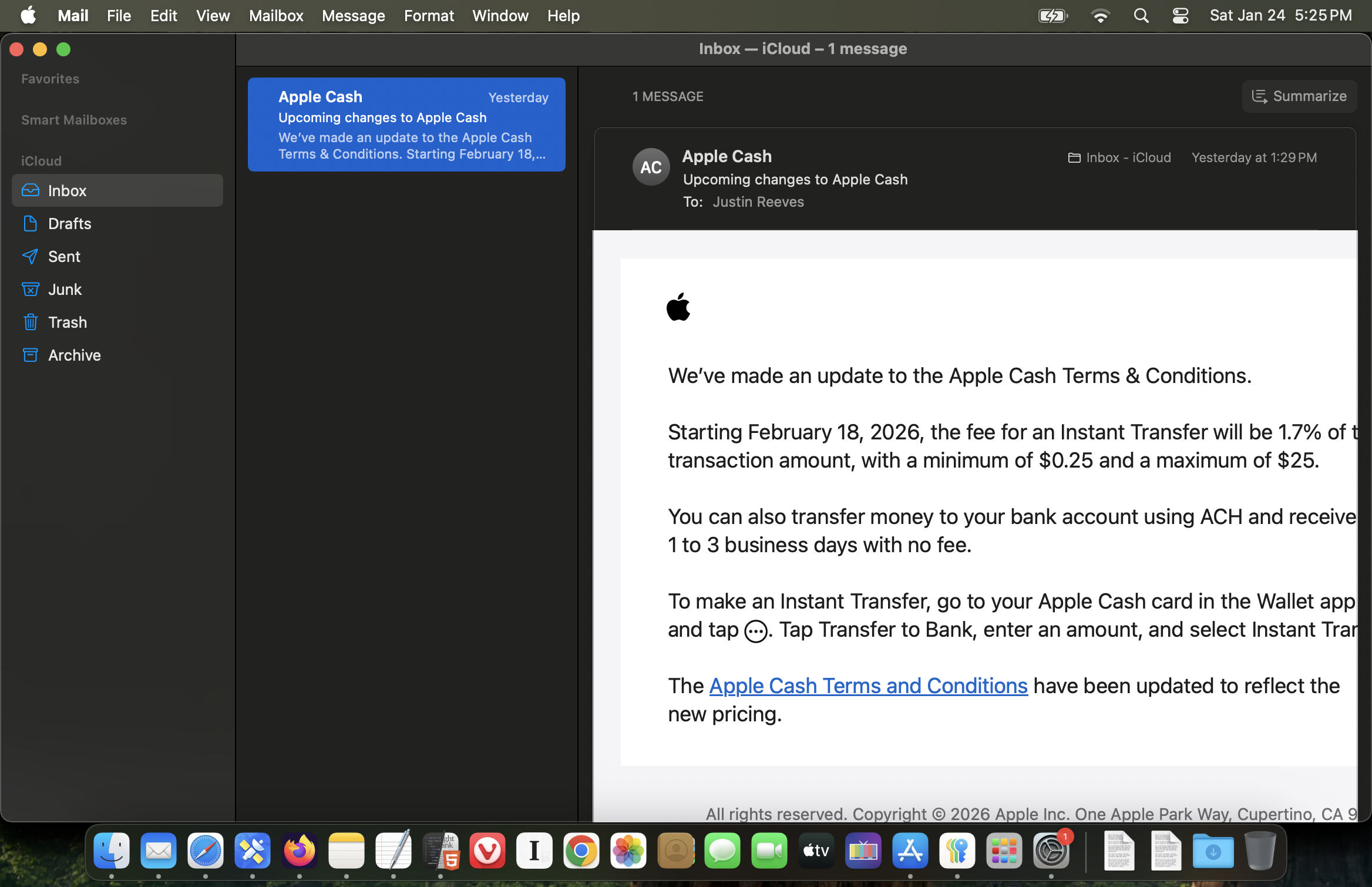
With System Settings → Displays → “Larger text,” Apple e-mails sometimes have horizontal scrolling on desktop, despite fitting on iPhone.
If I’ve received horizontal scroll mail from anyone else, I don’t recall it.

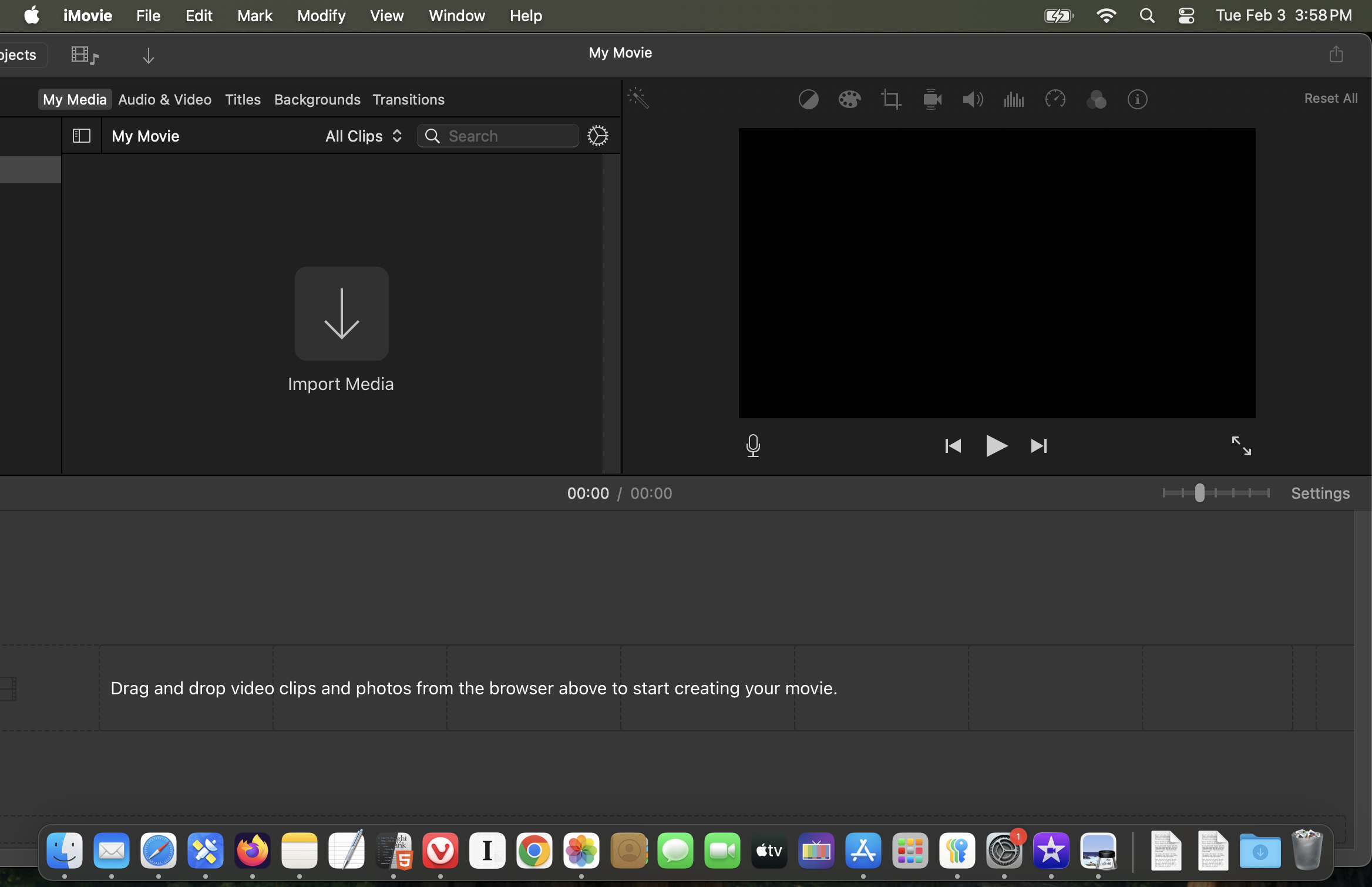
With “Larger text” on my laptop, iMovie won’t fit.
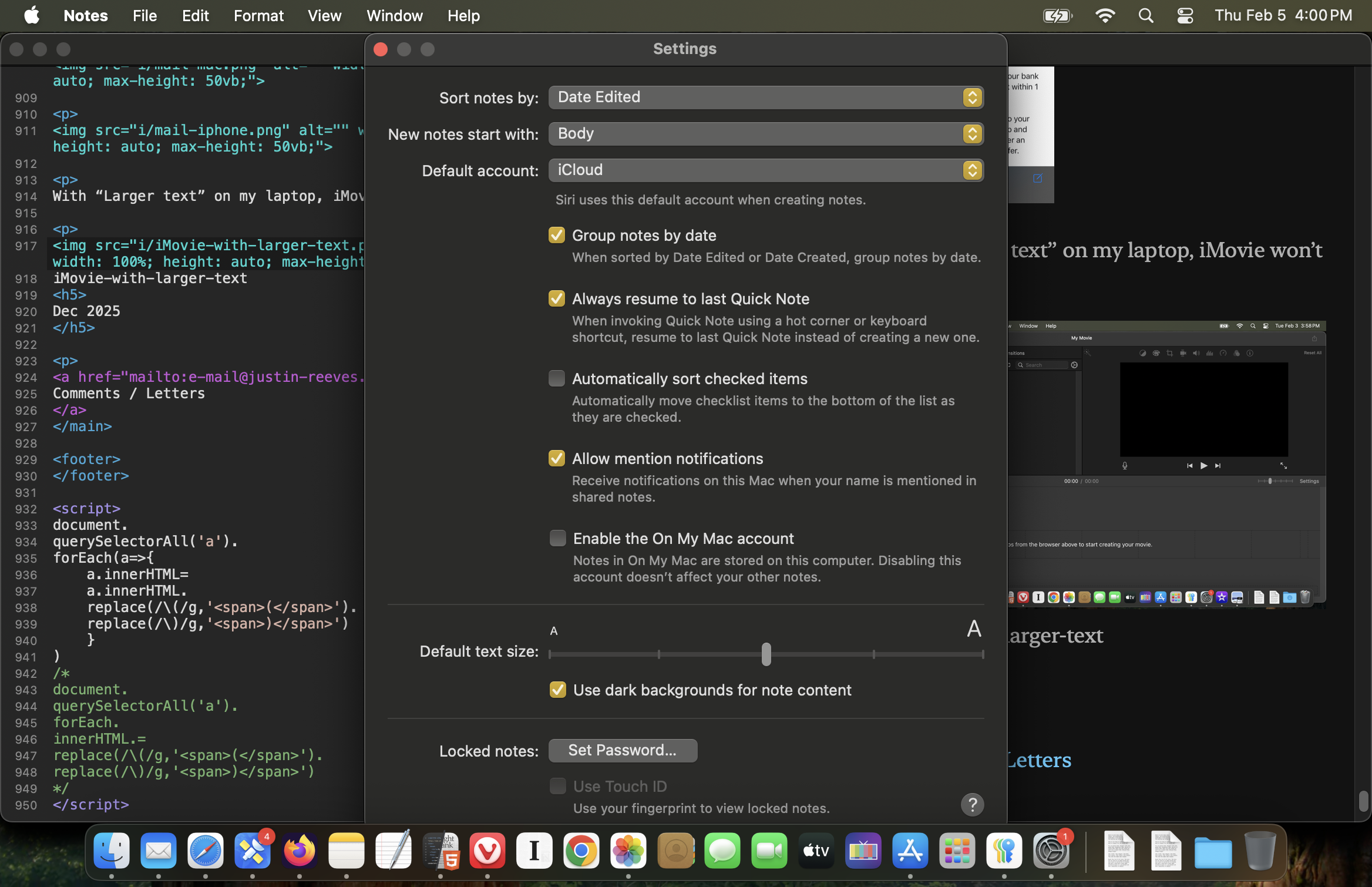
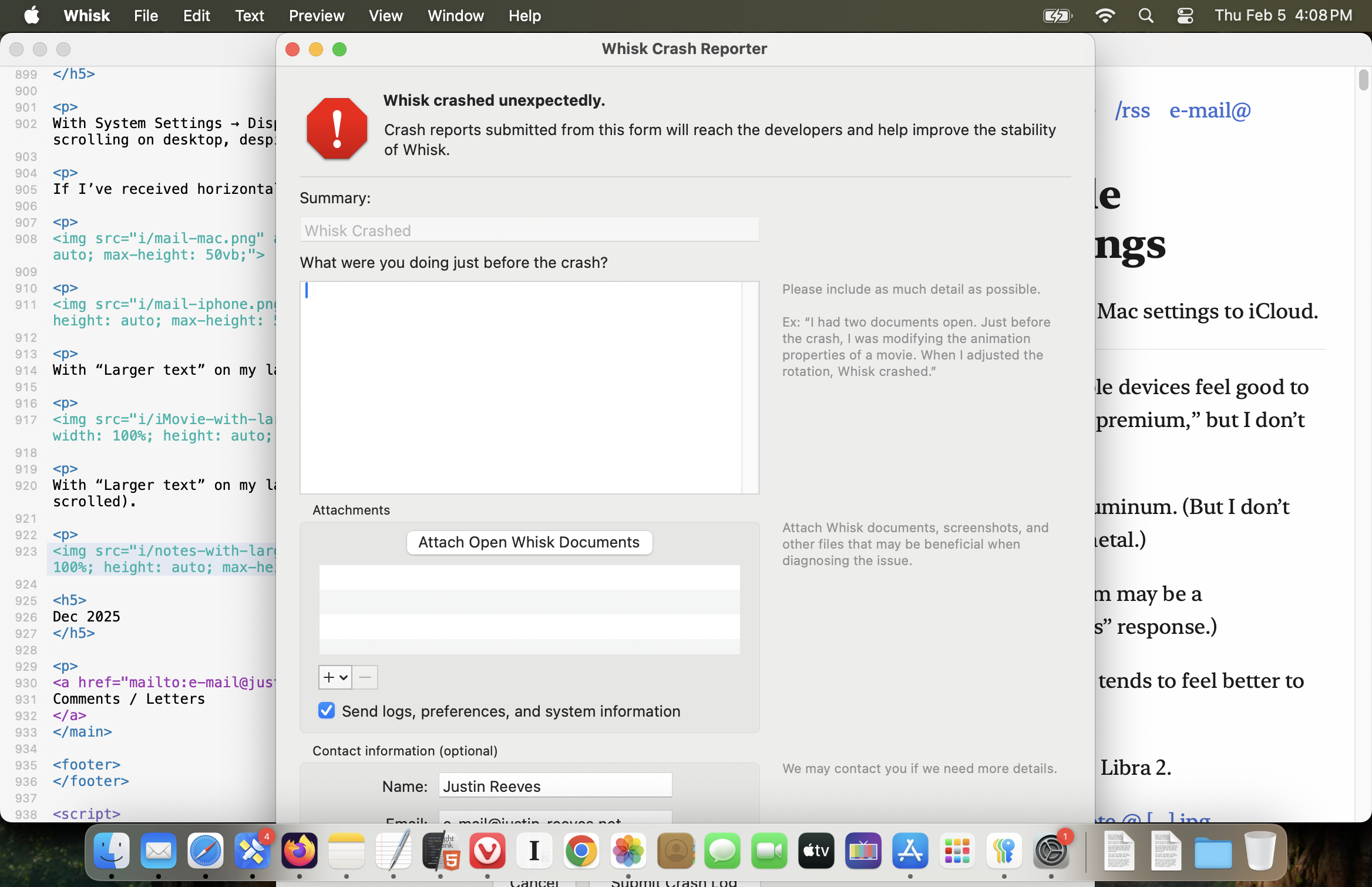
With “Larger text” on my laptop, some settings and alerts won’t fit (and can’t be scrolled).
Update Mar ’26
Even if they’re past, Apple’s Weather apps show the high and low from the calendar 24 hours, not the next relevant high and low.

Dec 2025
Comments / Letters